Showing posts with label Free Stuff. Show all posts

Saturday, December 21, 2013

Friday, December 20, 2013

Increase Traffic in Your Blog


1.Create great content.
Interesting content that can't be found anywhere else is what will keep readers coming back to your site once they get
there. If your content isn't unique or compelling, no one will want to visit your blog. Work on writing posts that offer your readers something informative, interesting, or fun that they can't find on other sites.


2. Choose a catchy and descriptive title.
The title of your blog is one of the first things that readers will see and one of the factors that search engines use to determine what your blog...
The title of your blog should let
readers know right away what your blog is
about. It should be easy to remember, not too long, and not too similar to another website's name.


3. Make your site easy to use
Good design won't save bad content, but bad design can keep readers from looking at your site. Make sure your blog is easy to read and that your most important features are easy to find. Recruit a few friends to check out the site and tell you if they have any problems getting around and reading
your posts. Depending on what platform you're using, you may have limited control over the design of your blog, but take the time to learn how to customize what you can and make your site as user friendly as possible.


4. Publicize your site.
Tell all your friends that you have a new blog. Ask them to check it out and recommend it to their friends. You can do
this by talking directly to your friends, sending instant messages or by putting a link to your blog in your webforum signature.


5.Ask for link exchanges
Seek out blogs and websites that cover the same material you do in your blog and ask if they would like to exchange links. If they accept, they will put links to your blog on their sites and you will put links to their
sites on yours. You can also exchange links with friends, but keep in mind that their websites may not have the same focus as your blog and their readers may not be interested in what you're writing about.
.
6. Guest post on other blogs
Most bloggers love getting guest posts from talented writers. Guest posts can help to publicize their blogs and give them a little time off from their own writing. Check blogs with subject matter similar to yours and see if they accept guest posts. Make sure to include a link back to your blog in the post so that readers can find the rest of your work. You'll also want to make a post on your blog directing readers to your guest post. This will allow your regular readers to check out what you've written for the other site and increase traffic on your guest post, making the other site more likely to want you to write for them again.


7. Join blog aggregators.
Make sure that they are informed when you update your blog, whether you do it automatically or manually.


8. SEO ( search Engine optimization )
Try to get your blog listed on the first page or two for search terms relevant to your
content. If your site has a high rank, people can more easily find your blog.


9. Post In Social Sites
Social bookmarking sites list websites and
blogs that have been submitted to them. If you have friends or regular readers using these social bookmarking sites, asks them to like or bookmark your blog. This will help your blog to become visible to more people.


10. Blogwalk
Blogwalking is visiting other blogs
using a lost of blogs you enjoy, following links from one blog to the next, or a combination of the two. Many blogs allow their readers to include a website when they comment. So if you leave comments on the articles you read, you will create more links to your site.


11. Post on hot or popular topics
If there are events or news that people are talking about, try to write about them in your blog. Some bloggers specifically choose controversial topics to attract attention. This may have some unintended consequences both to the popularity of your blog and your SEO techniques.


Common FAQ About Hosting

What is hosting?

Hosting origins from the word host which has different meanings that are familiar to you. Hosting means providing place for your website on the web hosting company’s servers and makes it viewable in the Internet and floating it.


Here Is Types Of Hosting


Free Shared hosting

If you want to host some non-profit-making or your personal web site it’d be more profitable to use basic shared hosting for no fee. This type of web site hosting is a rather logical choice if you are a junior in web site building or if you want to try some new idea and don’t want to pay. But of course you don’t have to suppose it to grant your site the best conditions, such as proper bandwidth and disk space. Some other features can also be limited, I mean MySQL, PHP support. It often also provides poor web statistics.

Paid Shared hosting

Almost all small businesses, intermediate and large professional sites use shared hosting, cause they don't need the whole server’s space and besides the whole server costs much. With shared/virtual hosting such necessary features, as multiply e-mail, MySQl, PHP, are supported. The main disadvantage is decrease of your site’s security.

Dedicated hosting/Server

This type of hosting is the best choice for those, who need much storage and bandwidth, and are good in server administration. You’ll be able to use all necessary software, but if you don’t have enough knowledge to administrate your server it will be a little bit difficult for you.

Co-location

It’s a sub type of dedicated hosting and can be compared with your own house which was built specially for you, with your favorite furniture and all. It’s built on your hoster’s (ISP) ground. This service is implied to fulfill only your tasks and is designed for your needs alone. And it’s cost is correspondingly high.

VDS/VPS

Virtual private server is a type of web site hosting that is based on dividing a physical server into several virtual ones. It costs less though gives same possibilities as Dedicated server. Now, when we’ve examined different types of hosting services, you can decide which type of hosting is the most suitable for you.

Green Hosting

As the earth is getting increasingly ill the web hosting industry is making an attempt in green hosting to do something about it. Green hosting is eco-friendly and is growing in popularity which has lead to more web hosts offering it to their customers. With eco-friendly means that the web host either purchase carbon offsets or use eco-friendly energy efficient servers. Green hosting is almost exclusively shared hosting which means that it can be a good alternative for you that want to do something for the environment and only require shared hosting for your website.

Cloud Computing

The other type of it hosting at the moment is called cloud computing. The easiest way of explaining cloud computing is in the way that it is different from the “traditional” hosting.
1.Cloud computing is elastic which means that the consumer only use as much hosting that is needed.


2.As a consumer you will only have to pay for the amount of hosting that is used. If you require a lot of hosting one month you will pay more that month and other months, when you require less hosting, you will also pay less.

The above mentioned qualities are also what make cloud computing as popular as it is today. Your hosting grows when you need it to and you only pay for the amount of hosting that you are using.

Host Your Site In Google Apps Engine


Here are quite a few advantages with hosting websites on Google App Engine. First, it should be more reliable since your site will get served through Google’s own data centers.
Cloud computing is currently in fashion for web site hosting. Unfortunately, it’s often also expensive. Enter Google’s App Engine, with free pricing for small sites consuming little bandwidth, and the best cloud hosting choice becomes clear.

The App Engine Dashboard, think of it as your control panel for the applications you host on App Engine, is quite nice.
Second, if you have a low traffic website, it is highly likely that you won’t have to spend a penny for web hosting. You get 1 GB of free storage space for hosting your images, HTML web pages and other files and 1 GB of bandwidth per day. If you exceed that quota, you pay-per-use similar to Amazon S3.
.
With a regular web hosting company, you rend some storage space on their server, you then transfer your HTML and other files to that server using FTP or cPanel and your website is ready to serve. Google App Engine works in similar manner except that the file transfer mechanism is a bit different.


Step 1
Go to appengine.google.com and create a new application. If you have never used App Engine before, you might be asked to verify your mobile phone number before you can create a new app.

Step 2
Give your application a name – it should be unique and may only include lowercase alphabets and digits. For this example, our app identifier is “thisismyawesomewebsite”.

Step 3
The next two sub-steps may scare some of you but trust me, they simply require you download and run two installers in the given sequence.
* Download and install Python from python.org.
* Download and install App Engine SDK from this code.google.com.

Step 4
Download and unzip this file - website.zip – somewhere on your desktop. It contains a basic website with some HTML pages, images and CSS that we’ll try to host with Google App Engine.

Step 5
Open the app.yaml file with notepad and replace the word ‘labnol’ with the application identifier that you created in Step 2 above. Save the changes.

Step 6
Finally it’s time to deploy /upload our website to Google App Engine. Open the Google App Engine Launcher program from the Start Menu, choose File and Add Existing Application and browse to the folder where you unzipped the website.
Hit the deploy button, input your Google Account credentials and within seconds, your website should become available online at abc.appspot.com where abc is your unique app identifier. Later, if you add or modify any web page, press Deploy again and your new /edited files will get uploaded to App Engine.


your website will be hosted as a sub-domain of appspot.com but you can register a web domain with Google Apps and map the App Engine website to your own domain.

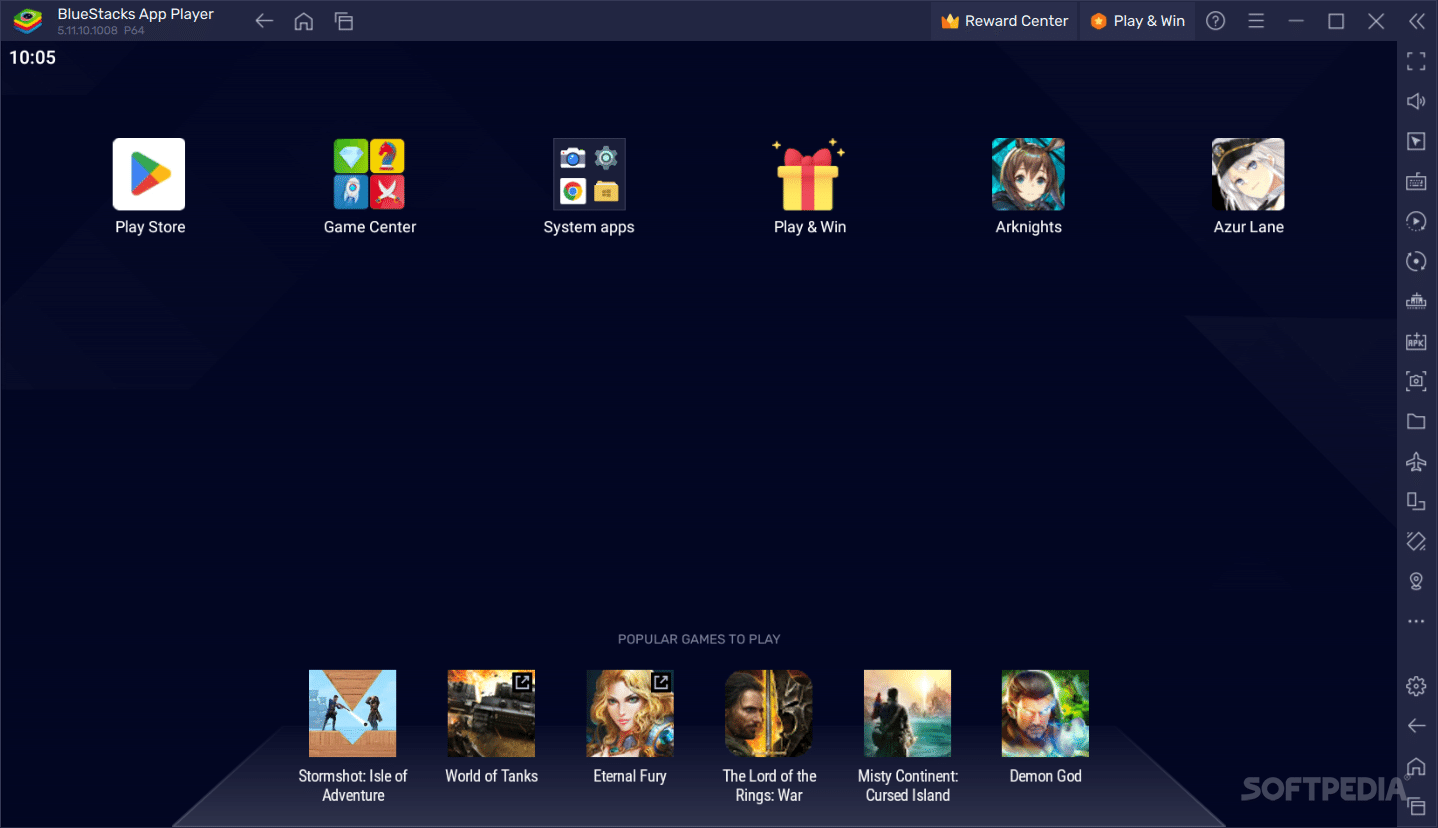
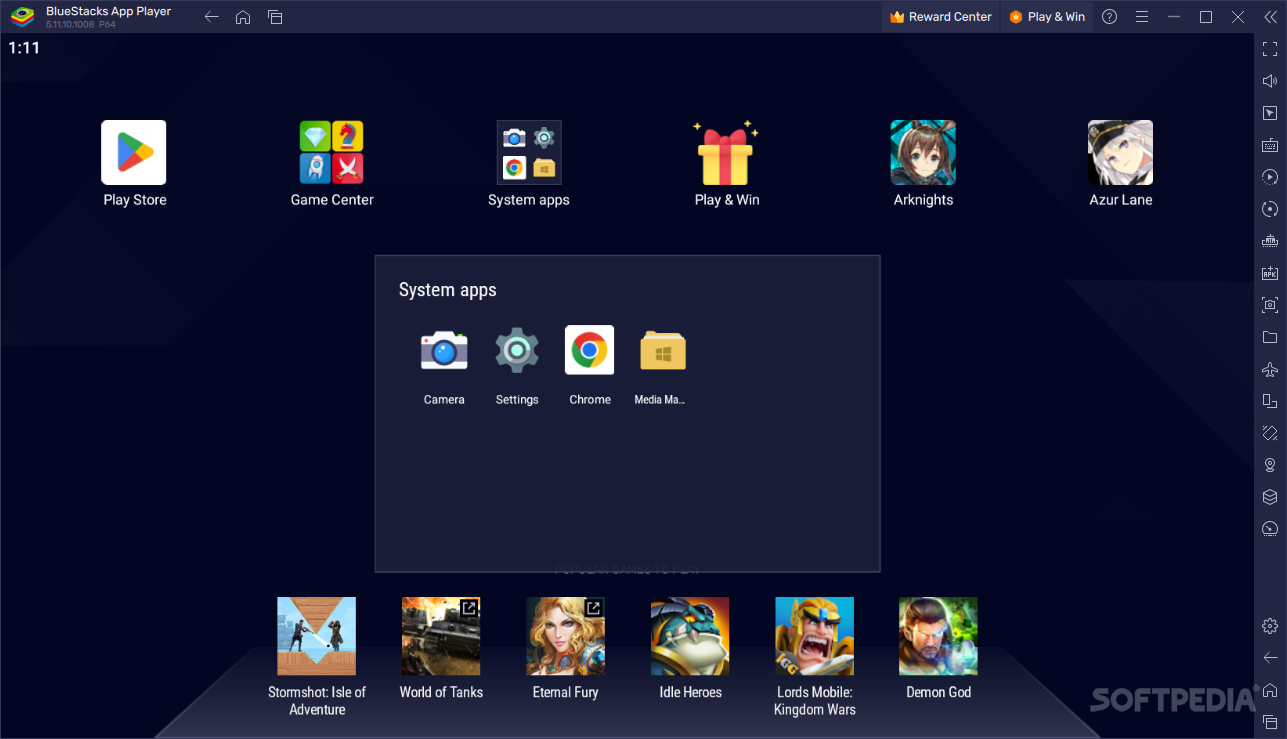
Bluestacks - Use Android Apps On Pc


A reliable utility that runs Android OS and apps on Windows PCs with instant switch between Android and Windows - no reboot is required


BlueStacks is an easy to use yet powerful software solution designed to run Android apps right on your Windows machine.

Boasting a very effective emulation engine, BlueStacks impresses thanks to its user-friendly approach, making everything easy as pie for all types of users, be they beginners or with a bit more computer knowledge.

Once installed and launched, BlueStacks displays 10 pre-loaded applications, with a dedicated option to allow its users download new ones from the Internet.

What's more, there is no separate configuration screen, but only a few options, so you shouldn't spend too much time setting up the program.


If You face Problem Using BlueStack In Windows 8 Then Use The Below Link To Download It

Error Free Bluestack For Windows 8

Thursday, December 19, 2013

Earn Via Google Adsense

I present Here Full Procedure To How To Earn Via Google Adsense....


What Is Google Adsense ???

Google Adsense is a program started by Google Inc. We know Google is a well known search engine and 90% of web users are using it. Because of this popularity more advertisers are
interested to place their ads on Google search results page. We are also seeing some ads on Google search results whenever we used Google.
Actually Adsense has started to allow ad publishers to place these ads on their web pages. I am not sure, but Google will pay only 50% or 60% of ad cost received from advertiser to the ad publisher. Google is acting as middle layer and helping small website owners to get revenue from
this Adsense program. We have to say Thanks to Google for providing such good money generator program.


How to earn money with Google Adsense ????

Earning money with Google Adsense is very simple, but your website must have good and new information. Initially you must have one valid e-mail and a website. Follow below steps to start earning with Google Adsense.

1. Click on the link Google adsense and click on SIGNUP NOW button to create a new Google Adsense account.

2. Provide all valid information in the application form and submit your request to create Adsense
account.

3. Google Adsense team will check the details provided by you and your website information.
They will reply to your mail address given in application form after verification. The reply mail contains information about acceptance or rejection of your application and in case of rejection they will provide the reason for rejection also. Make corrections and send request again in case of rejection.

4. If you received acceptance mail from Google Adsense, you are lucky guy and you gained access to place ads from Google in your website.

5. Google Adsense will generate java script/html code according to your Google Adsense account, you have to place that code in body of your web
page. On browsing your website, the Google Adsense script code generates Ads related to the information on web page. If any user clicks on this ad you will get money.


++ More About Placing Ads ++

Placing the Ads correctly is very import for good earnings. The best placement for Google Adsense ads varies from page to page, depending on the content. The best place to place Google Adsense Ads is wherever the web site visitor will be looking.
.
Ads on the Top of the Page
Advertisements at the top of the page perform well. Chose the ads format which mixes with your page color and style. For example if your web page has a white background color and default color of your
links is blue, then you remove the border from Adsense, make the ads background color white.
Ads on the bottom of the Page
Ads on the bottom of page does not perform well. So, don't concentrate on the bottom page ads
Ads on the right bar
Usually the right bar is for web site navigation, usually right side ads performs best.
Ads on the left bar
The left bar ads performance is also good.


Monitor Your Earning


Now your web site is earning for you. Your web site will earn while you are sleeping. You can logon to the Google Adsense account and check your earnings.


***Payment Method***

Standard delivery checks
generally arrive within 1-2 weeks of the mailing date in the U.S.; outside of the U.S. typically arrive in 2-6 weeks.
Secure delivery checks
generally arrive in 5-7 days.
EFT payments
should arrive in your bank account within 4-10 days.
Western Union Quick Cash payments available for pick-up at a local agent the day after they are issued.
Rapida payments
available for pickup at your local post branch two business days after they are sent.


========================================================

*** Reasons For Getting Banned From ADSENSE ***


1. The clicker's IP address matches the one on your adsense account.
It's a no-brainer. Don't click on your own ads.

2. Suspiciously high CTR
According to a report I read, anything above 10% will be flagged, but 6% or 7% would probably be a safer limit.

3. Clickers IP addresses come from the same geographical area
This is for those who think they can get away with clicking on their ads from their friends computer, their grandma's computer, and their neighbor's computer. This will raise the red flag on your account, however if the site specific to a region, say a current events website - almost all clicks would be coming from the same region.

4. Cookies
Most users don't use the same IP address every time they login. That's why google stores the IP addresses related to a particular user in a cookie. If you thought using a proxy clicker bot was gonna make you an adsense millionaire, don't quit your day job.

5. Short-stay pattern
Usually, visitors on your site take a few seconds to check out your content, and then maybe they'll click on your links. Google doesn't like it the other way around, i.e. if they only stay a few seconds just to click on links.

6. One-site pattern
Google compares different users' activities on different sites. It will ask: why is this user clicking on ads on site X and not on any other site?

7. Direct-access pattern
Google doesn't like it when one category of users clicks on your ads more than another. In particular, they don't like it when users who access your site directly (i.e. no referrer) click on your ads but no one else does. So much for click exchange forums.

8. Big Brother
Google doesn't just own adsense. They also own gmail, google earth, and a host of other applications. They WILL track your IP across these applications so don't think that just because you don't use an IP to login to adsense you can use it to click on your ads.

9. The invisible website
If your website doesn't rank highly on google's search engine, they may get suspicious if you get an insane amount of traffic and clicks. The traffic won't get you banned, but all those clicks better be legit.

10. Begging the click
Don't write stuff like please visit our sponsors on your webpage. You have to be a moron to think that Google can own a search engine and not find out about this sort of thing.

11. Conversions
Conversions are tracked by the adwords owner placing a code on whatever page they consider to be a conversion. Most often its a thank you page for the completion of an order or sale, leads, or view of a key page.Google has some strong detection methods but they don't have magic powers. The reps at Google are less than forthcoming but the last three I have spoken too have all pretty much said that the majority of people they cancel are being just stupid, clicking their own ads and trying to disguise them as being part of the 

Free Domains-Host Detailed List


**Free Subdomains**


www.dot.tk

www.cjb.net
www.v3.com
www.hotredirect.com

www.internetjump.com
www.webalias.com
www.warping.to
www.shorturl.com
www.has.it
www.myredirector.com
www.tr.cx
www.kickme.to
www.suite.net/url.htm
www.ontheweb.nu
www.globalredirect.com
www.linkworld.to
www.webmask.com
www.guruguru.to
www.6x.towww.b4.to
www.b6.towww.h3.to
www.thx.to


**Free hosting provider**


www.freewebhostingarea.com
www.1freehosting.com
www.byehost.com
www.110mb.com

www.webs.com
www.000webhost.com

www.freehostia.com
www.zymic.com
www.freewebsitehostings.com
www.50webs.com


**Premium Hosting**

www.x10premium.com
www.aspirationhosting.com
www.premium-host.com
www.plusplushosting.net
www.000webhost.com
www.110mb.com
www.webhostinghub.com

** Free Host 4 ASP.NET **

www.webhostforasp.net
www.asphost4free.com
www.7host.com
www.freehosting1.net
www.forums.asp.net


=============================================================

As we all know, not all of us can afford a .com or a .net or a .org domain. Here is a list of more different sites that have short domain names. By short domain names, i mean .co.cc and .tk

www.nic.cz.cc
yoursite.cz.cc

www.co.cc
yoursite.co.cc

www.dot.tk
yoursite.tk

www.com.co.in/home.html
yoursite.com.co.in

www.c-o.in/myred/home.php
yourname.c-o.in
yourname.c-o.cc
yourname.coz.in
yourname.cq.bz


www.unonic.com/
yourdomain.net.tf
yourdomain.eu.tf
yourdomain.us.tf
yourdomain.int.tf
yourdomain.ca.tf
yourdomain.de.tf
yourdomain.at.tf
yourdomain.ch.tf
yourdomain.edu.tf
yourdomain.ru.tf
yourdomain.pl.tf
yourdomain.cz.tf
yourdomain.bg.tf
yourdomain.sg.tf


www.smartdots.com/
yourdomain.eu.tc
yourdomain.us.tc
yourdomain.int.tc
yourdomain.de.tc
yourdomain.at.tc
yourdomain.pro.tc
yourdomain.de.tc
yourdomain.co.at.tc
yourdomain.es.tc
yourdomain.ru.tc
yourdomain.ua.tc
yourdomain.se.tc
yourdomain.dk.tc
yourdomain.be.tc
yourdomain.pl.tc
yourdomain.bg.tc
yourdomain.cz.tc
yourdomain.mx.tc
yourdomain.br.tc
yourdomain.hk.tc
yourdomain.kr.tc
yourdomain.th.tc
yourdomain.ph.tc

www.co.tv/
yourdomain.co.tv

www.eu.tv
yourdomain.eu.tv

www.uni.cc/site/home.php
yourdomain.uni.cc

www.eu.org/
yourdomain.eu.org

www.yi.org/
yourdomain.yi.org

www.friko.pl/
yourdomain.xorg.pl

www.da.ru/
yourdomain.da.ru

www.bee.pl/index.html
yourdomain.bee.pl

www.za.net/
yourdomain.za.net
yourdomain.za.org

www.9hz.com
yoursite.nhz.com

Detailed Info About Website Related Things

Here Is the Fully Details Procedure


Introducion

Everyone wants to have successful site without working on it. You can forget about that right now, there's no such thing. All of us started somewhere. As a newbie in website developing I recommend you to learn HTML and PHP for start. At least learn their basic codes and functions and later if needed upgrade your knowledge. Here are few questions which I want you answer:

How badly you want to have good site?
Are you willing to do basically anything to get it working?
Do you think money is important when starting website?

I guess now, with your motivation and devotion we can start.


Gets things you need


It's your choice what tools you need to make your first website. I'll show you everything I know in order to get it. At its start, you need to decide what type of website you want to make, either its gonna be blog, forums, sales website or miscellaneous website type. 

The Two Things U need It :::

1. Domain


Getting a good domain is very important. It helps search engines like Google, Yahoo and others to find your site. Having domain related to your content will help search engines to find it easier and it imporves your site Search Engine Optimization also known as SEO. You can get free or paid domain. I'd recommend a paid also known as TLD (Top Level Domain). Here are few good sites from you can get TLD:

.
godaddynamecheap
.
or usually when you're buying hosting you have option to buy a TLD, too. Sometimes its for free and sometimes you pay few bucks. If you still want to have free domain then you can visit Co.Cc and dot.tk to get one. Now our next part is hosting.
.
2. Hosting


Your site needs to be visible on internet and hosting does that. Hosting which I strongly recommend is 
hostgator.com


Here are their list of features for shared hosting:

*Unlimited Disk Space and Bandwidth
*Flexible, Easy to Use Control Panel
*Unlimited Sub Domains, FTP Accounts, and Email Accounts
*99.9% Uptime Guarantee
*No Contract with a 45 Day Money Back Guarantee
*Safe Harbor Certified (Details)
And many more which you can see on clicking to compare all hosting plans.

[ If you want to use free hosting see my below post of site list ]
.
Now we have domain and hosting ready for our site. Next thing we need to what you want to use on our site.


Basic Site


If you are going to create site from scratch use Kompozer as your tool. It's very good for starters with enough options. That is only to create a basic site but wait, we can make your site even better with few bucks extra bucks. For achieving that, lets head to DreamTemplates.com. Choose template you want to use and pay for it. After you paid, you have unlimited access to templates in certain period which you paid (1/2/3 years or lifetime). To edit template how you want, you need DreamWeaver which you can pay for or download from torrents for free. When you're done, just upload to your ftp with FileZilla (recommended, instead of using cP uploader). You can get sites from free from WordPress or Drupal.That was the story for basic site.


Blogs


These are easiest type of site to manage and handle. For making one, you don't need hosting and you can choose subdomain when you're making blog but it is recommended to use TLD. You can get your free blog from Blogger or from Wordpress.

Custom Sites


These sites require coding or modifications. They can be about anything and they can include everything every type of site shown above or something totally custom. For those you must know HTML and PHP. Good place to learn web developing languages is W3Schools.If you're lazy to do this, then pay someone to make it for you.
.
Okay, we done that "technical" part of making your site . If you're tired so far, this is only beginning and easiest part of your way. Pay attention what is next.

Advertising


This is the biggest, hardest, time consuming part which most of webmasters fail to complete. Getting your site known to people is most difficult part. Here is the thing you need to complete, that's of course, SEO.

Content


This is very important. When you're making site, you must know content of it. Making site about something which you don't have a clue won't get you far. When having a site, try to make as much content as you can so site has more content which can be SEO-ed.
.
.
Search Engine Optimization (SEO)


Ah this one is hard for me, too. If you don't know what is SEO click here. So the thing is you need to make your site SEO-ed good enough to appear high on google. What are the methods? Well, your best resource for that is Wikipedia.
If you don't like/avoid to read much, you will fail at this point which is most important. First you need to know what are SEO methods and then to find out how to work on them.
Look, understand and implement these:

Getting indexed
Cross Linking
PageRank
Link_farm
Comment_spam
URL_normalization
Meta_tag
Backlink
SEO_Trending

There are more, but those are enough. Good thing is when doing SEO purchasing SEO tools. They can be expensive but they are great things if you know how to use them. Again I'm saying, inform yourself good about SEO methods or you won't know how to use SEO tools. You can search on Google for SEO tools. 

Using another sites like Facebook, YouTube and Twitter will help you advertise your site and give few backlinks. 
For Facebook: Make fan page/group and get people to join it somehow. Use something interesting to attract people. After that advertise your site in your fan page/group.
For YouTube: Make a video about your site and what you offer. YouTube videos boosting will get you extra traffic and your videos will be popular and have enough numbers of views.
For Twitter: Add many people to follow you and after that, announce your site. It won't help much but it's better than nothing. 

Once you get your site popular enough, you're in good way. You're on good way becoming number 1. Keep in mind that making good site won't come over the night. It takes months, even years to make it great place to be.


Getting back invested money

If you invested in your website that's great. If not, that's ok, too. Now I'm going to show you how to get your money back and gain more of it when your site is popular (At least 200 unique visitors per day, that's minimum and it's good rate for now). The thing is to put ads from Google or some partners. If you have forums, you can charge for paid sticky or something like that. There are no limits with possibilities, try new things. If you have good content site, you can make CPA gateways on it. Same goes for blog. You can use no matter what money making method if your site has traffic and good content. I'll give one example. Lets say you have video downloading site. People who want to download videos from YouTube or somewhere else are going to come to your site. To be able to download video, they need to fill survey or something like that. Having in mind that guy/gal who wants to have that video badly is going to do anything to get it which means profit for you.

Also, there are other ways. Since now, you should be experienced webmaster. You are good with SEO and know to program 2 languages. Guess what? That can make you money, too. You can sell your services and do SEO for people or code for them. If you're good with graphic, you can learn CSS and design custom themes for forums, blogs and others which is very big profit if they are made professionally. Remember that practice makes perfect.


Website security


As some people be jealous of your success, they will try to hijack your website or its content. To prevent all of that, you need to protect your content with copyright law. Copyright is a set of rights which belong to author or creator of some work. By work, it can be almost anything. With those rights he can copy, distribute and adapt the work. There are exceptions like fair use doesn't require permissions to be given from author/creator. All other uses must be approved by its original author. Now we're going to move on how to protect the website itself.


Firewall on web servers

Using a firewall is very good option. It will prevent almost anything to get to your site. What online firewall do is same as firewall on your home pc, blocks inputs which can harm you computer. In this case it's your website. They can stop Ddos attacks or if you use paid hosting like Hostgator (which I again strongly recommend) you have ddos protected site and I think you get some firewall and other features to deny IP's and members from your site. If you're purchasing a firewall, that can be very expensive but if your site is poplar, large and takes attacks everyday, you should have it.
.
.
Enforce strong security policy
This is mostly for forums. In ACP you can put as a must to have strong password. Also you should make a privacy policy which will help your members understand, what information you collect from and how it's going to be used. Here you can read more about internet privacy if you're a member of website which collects your personal information.


Apply patches and software updates
This is very important step. Updating your forum/blog software will help in security of your website. Here's how: when software is updating it's usually new features add and extra security measures. Old version had either small bugs or vulnerability was found in it so it's very important to update your website software. Run check once a week and don't run on old version(s).
.
.
Backuping
This is very important, too. Always backup your site if you're installing something new, like updating software of website. In case something goes wrong, you won't be able to fix it. Backups are done via phpMYadmin and/or downloading your files from ftp. Backups should be done after 2 weeks or a month, in case you get hacked or hosting dies, etc.


Limiting resources on your website
Limiting what people (guests) can see on your website will help against leeching your content over the internet (this is violating of copyright law if person didn't ask you for permissions if he/she can take that content or doesn't give credits to original creator/author). There are many ways to do this. Lets say you have forums with PHP scripts which are finished and totally working. You can limit that guests can't see threads, boards or they need certain amount of posts to enter it. If you have blog or something like that, you can put CPA widget in order to download it. For picture sharing sites, you can disable right click (may not help much) or add site credits on all pictures. I'm leaving you many more possibilities to work on.


Ddos attack


To prevent this, you should use paid ddos protected hosting. In that way your site will remain up even if some Ip is flooding its bandwidth. If you have a firewall, you can block certain countires, vpns, ip's to access your site and that will stop ddos attack in its tracks. Having this with a free host will only get you big trouble because you're loosing traffic (if it has 200 visitors per day) and potentially money.

Conclusion


As a reminder to you, nothing will grow up in one day, for everything it takes time. Don't be crushed if you don't succeed first time. With time you will get better and have more experience. Don't be afraid to ask question on support websites. Everyone started from zero's and some of them became hero's. Use Google and YouTube as your best resources before asking for support on support websites. Remember, lots of sites developed SEO and they are easy to find on Google, do same with yours. Be careful who you give permissions and make sure they earn that (this isn't for support, it's for mods/staff/admins on your site/forum). I hope this will be helpful to newcomers in web developing business. Remember to update yourself constantly with new knowledge, tips and tricks, use your brain . 
If you would like to help me in some way because I wrote this guide, then please register on TechBoost.org and remain active member. We are still in new faze but we're running good for now.

How To Make WebSite


I present Here Full procedure how to make website....Because I noticed that our forums many member don't know this....
.
Procedure
.
1. 
Web Hosting

first of all, you'll need a web host or account on a web hosting server. Web Hosts are nothing but websites which provide you online space to store your content, just like a hard disk in offline mode.


**For free web hosting server see my first post.


2. Domain 


Then u need to get your own domain. Domain is just like your address, e.g. Frendz4m.com...
This is needed so that u can give your users this address to access your
website... 
[[ Note - If u not do this than your website name as username.webhosting name.*** ]]


3. Website Content


then you need to focus on your website content, means what will be there when your site is accessed ! If you want to build a personal/private page...u can build it by offline Html coding and then upload it on your hosting cpanel ! Or u can go 4 some online website builders like 110mb.com,yola.com and many other [ google it ]

4. Online Software


but if u want to go for a specific kind of site lyk blog or forum, then u have to install a blog/forum software on your webhost [the task is a bit advanced ] . But if u are not comfortable with it, no problem , there are auto webhosts for them.


**auto web hosts are the sites which provide you automatically installed software. U don't need to install the soft on your hosting account. Just register on the auto host and u'll get ur readymade blog/forum 


**wordpress.com, blogger.com ,blogspot.com,bigadda.com for various types of blog autohosts.


***More Info About Domain***


for a full fledged .com or .net etc. Domain, you'll need to pay an amount ! So for free subdomains, u just register
at any of the redirection sites, and setup your account manually !
Eg. If u choose www.dot.tk, then make an account there, choose a domain and under url forwarding
option, configure your domain to go to the web address where u want !
**although when u'll build on an autowebhost, it will automatically gv u an adress like xyz.wordpress.org
**for urlshorteners and free subdomains see my first post
**for paid domains, u need to register at godaddy.com,webmaster.in etc. !
**to build a wap/mobile site : i wud like to suggest peperonity.com, wapka.mobi etc.
.
I hope the info is clear now ! U can post if u have some more info, or any queries...


Now Make your own site...

Insult your facebook friends


Hi all.. This trick is very simple and very funny. Its all about insulting. 
So don't try this someone who is very sensitive. 

http://www.is-a-jerk.com/

is a funny website they give a free service to insult someone.
Just give the Person name before the .is in this URL. 
Just give your friend's name in this Link and give that link to your friend via Facebook or post the link in their wall. 
And just ran away from him. 
This is really Very funny trick. Have Fun and bring peace.


Example Type:

www.frndname.is-a-jerk.com

First post this link 2 ur address bar n check what it show

Post it 2 ur frndz fb wall or msg him that link

I am mobiLe useR (NO -SC)

Try this u can understand

http://www.abc.is-a-jerk.com

Remove Background Of Any Picture


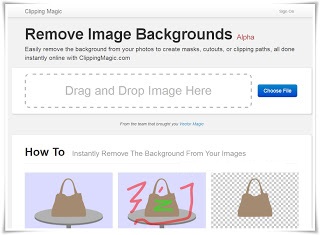
Removing Background of any image or picture by using Photoshop or other software is slightly difficult, if you don't know how to use them.Well,Photoshop is a great software and offers you great features but using Photoshop is slightly difficult and also while removing background of any image using it sometimes ,If your mouse slips while selecting layers , then you are in great problem :p Well today I'm going to introduce you to an amazing tool which will help you to remove the background of any image so easily that you will feel great with this wonderful and amazing online tool.You Do not need to install any application or anything other to use this Online tool You just need Internet Connection. Now Without Wasting much more time let come on the main point 


How To Remove Background Of Any Picture Easily ?

Tutorial

Step 1 :-Open Clipping Magic Official Website [ Link ]


Step 2 :-Open Any Image In It , You can also drag image to upload .


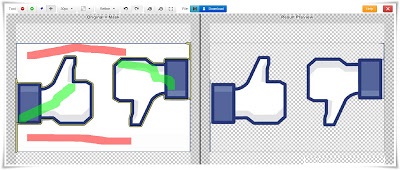
Step 3 :-Now , you will see editor in it.Now you have to use the brushes of different colours to mark foreground and background


The Red Brush is used to mark background.


The Green Brush is used to mark foreground.


After marking you will see you results in right side 

That it .!


Congratulations You Have Removed Background Of Your Pictures !
Now The Most difficult Step  Download that pictures by clicking on download button(on top centre ).
According to me this tools is the best tool in the world and i would like to helps Clipping Magic Admins to provide us such a great online tool ! 

Hope u all liked it..

Trick to Drag Your Facebook Chatbox Anywhere


Guys We Know Facebook Chat box has its Fixed Position . But Today We Will Learn To Drag Your Facebook Chat box anywhere On The Screen,

This is an Awesome Facebook Trick which you willl Like to Perform and Show Your Friends.


We will Use Just 1 Google Chrome Extention Which Will not only enable you to Drag you Chatbox Everwhere but you will also Experience Increase in the Size of your chatbox.

Step 1: First of all To Add Pretty Facebook Chat Extention To your Chrome Browser

https://chrome.google.com/webstore/detail/pretty-facebook-chat/ihamlfilbdodiokndlfmmlpjlnopaobi?hl=en

Step 2: Click on Add to Chrome then you will be asked to Confirm New Extetion, So click on Add Button.

Step 3:The Extention will Start Downloading, Once Downloaded , Just Open Your Facebook and See Your Chatbox. Now You can drag it anywhere on the screen and also the Size of the Chatbox will increase.


Note: If you Want To Revert Changes then just Goto Setting Tools Extentions and Disable the Extention. Or You Can Delete it if you think You Will not Use it again.

FOR FIREFOX USERS TRY THIS ADDSON

https://addons.mozilla.org/en-us/firefox/addon/facebook-chat-history-manager/


Bookmark a YouTube Video And Watch From Where You Have stopped


Would like to bookmark YouTube video at the position which you are watching now? You can easily do that just by following my new trick given below. The best past of this trick is that you don’t need any software for this. And also this trick helps you a lot to avoid some time consuming work. That’s is ,if you are watching a video and suddenly you got some reason to stop playing that favorite video. In future(next time) you need to play that YouTube video again then seek to that position where you have stopped, really boring. But using my new trick you can just bookmark the current video you are watching at the current time and you can resume it from that point itself, so just follow this easy trick and enjoy.


1)Go to YouTube.com

2)Play the required video

3)When it’s time to stop(bookmark) right click on the video player

4)Select “copy video url at current time”

5)That’s all now a bookmark is saved in your bookmarks with the current playing time(00:00:00)

6)In future just click that bookmark and the video will resume playing from where you have stopped.

Change Your Fb Name Beyond Limit

Hello Guys, now I'm not sure how many of you know this but this is the best way of making either a hacked FB yours or changing your name When you can't any more you can still do this with FB it hasn't changed Anything so Here we go
Go to Facebook.com

Now In the top right hand click the down Arrow and click Account settings


*Now once in Account settings Click The security tab with the little Shield next to it and then click Deactivate Your account


*On next page
You Should choose ''My Account was Hacked'' this is the next step..


*Now It where it says: ''You can secure your account here.'' Click the Link located to be taken to the Next Page.


*Press continue for the next two pages


*Now Just enter a new Password, make a nice strong one, after that Just hit the continue button

Now you can change the Email, Choose whatever email you want to replace it with a new one then hit continue

After that you will be taken to Your name Change, now you can change your Name without having the limit.

And finally the final steps are the security questions and then verify that you're Happy with your changes. this changes your username and passwords, it's good for if you want to change your FB name....


Popular Posts

Blog Archive

Powered by Blogger.

Followers

Search This Blog