Showing posts with label facebook Tips. Show all posts

Thursday, February 20, 2014

Facebook Bought WhatsApp Messaging Service for $19 Billion


Facebook founder Mark Zuckerberg
Facebook founder Mark Zuckerberg explains why his company has paid $19bn for mesaging service WhatsApp. Here is the statement he released: 
 I'm excited to announce that we've agreed to acquire WhatsApp and that their entire team will be joining us at Facebook.

Friday, February 14, 2014

Quick Facebook Shortcut Keys For Mozilla And Chrome

Quick Facebook Shortcut Keys For Mozilla And Chrome

     We are using facebook in our daily life.But most of the users yet don't know about shortcuts for using facebook.So here i am going to post list of facebook shortcuts for Mozilla Firefox and  Google Chrome.It change your social life and make it fast.

Monday, February 10, 2014

Get Notified When Someone Unfriend You On Facebook In Mozilla And Chrome


Get Notified When Someone Unfriend You On Facebook In Mozilla And Chrome
    

     Facebook is the very dominant way to stay in touch with your friends,employees,family members and other peoples.Facebook allow you to send friend request to any one on Facebook.You get notification when someone accept or send friend request,but Facebook doesn't notify you when someone unfriend you from their friends list.But by using Unfriend Notify Plugin for Mozilla and chrome you will get alert when your Facebook friend unfriend you for any reason.

Saturday, January 25, 2014

Friday, January 24, 2014

How To Make Passwords More Secure


Hackers are going smart and they easily can guess your password using number of Brute Force tools available.Every now and then ,we see hackers hacking into most secure databases and exposing huge databases compromising security of millions of people online. .Common incident recently,Snapchat database was hacked and the details of millions of users were exposed. Hackers most often do such activities to show their existence or just for fun. This fun, however can be controlled upto a certain level using smart techniques.

Thursday, January 23, 2014

Facebook May Lose 80 Percent Of Users By 2017: Study

Researchers claim that Facebook is likely to lose 80 percent of its users by 2017.
Facebook may lose 80 percent of users by 2017: Study
A recent study by researchers at Princeton University has revealed that Facebook is likely to lose 80 percent of its users between 2015 to 2017. Researchers found that from a study of charts produced by the Google Trends service which shows Facebook searches peaked in December 2012, but have been declining since then.

Sunday, January 19, 2014

Save Data Usage On Facebook Using Data Efficient Mode

No doubt, Facebook is the most popular social sharing network used by millions of people online. Facebook can be accessed by Web using standard Web Browser, Mobile Applications available on all mobile platforms, Mobile Browsers etc. Facebook wall no doubt contains a lot of images and consumes a lot of data un-necessarily even if not required by user. 
Tips to minimize data consumed by Facebook

Thursday, January 9, 2014

Verify Unlimited Facebook Accounts With Single Email ID


Verify Unlimited Facebook Accounts with same Email Address

Many times we need more than 1 Facebook account. So , to make 1 new we has to do a bit more efforts to set up a new Mail account first then verify Facebook Id with the account .
So, here is an amazing trick to verify as many accounts as you want to with the same email ID.

Friday, December 27, 2013

10 Hidden But Amazing Features Of Facebook


Its a known fact that Facebook is the most widely used social networking site with more than a billion registered users. And it is also a commonly accepted fact that most of the users visit the site at least once in a day and few of them are hooked on to it 24x7. Every day, checking your Facebook account doesnt mean that you know all about it. Facebook homes some of the hidden but amazing features that you might have missed since form long time. Here are top 10 of such features as reported by The Telegraph.


10 **View Photos in a classic way**

If you dont like the pop up black box appearance of the photos, you can simply revert to get a classic view of your photographs by pressing F5 on your keyboard. With this you can flick through your album photos rather than clicking on each photo separately.


**Create an interest list**

Based on your interests you can make use of the option for creating an interest list. You can either follow other peoples list or else you can make an interest list. For example you can make a list of @Must Visit Non Popular Places in India.
For creating an interest list Visit https://www.facebook.com /bookmarks/interests and click the Add Interests button. Then click Create List and search for the people or Pages you want to add to your list, or browse the categories towards the left. After selecting the things you want include, decide a name for your list and select a privacy setting .Choose Public if you want others to subscribe to your list. In case if you are following a list then you can see the updates from the list by clicking the topright of your homepage.


**View Friendship History**

This feature can be used to brush up your old memories. If you want to look at the Facebook interactions that you have had with a particular friend, go to their profile page, clicking the arrow in the top right corner and select See Friendship from the dropdown menu. In case if you have added a relationship to your timeline with the friend you are searching then go to https://www.facebook.com/us to see the friendship page for you and your friend. For getting the friendship page for two of your friends you just go to a friendship page, and then click More and type the names of your friends.


**Check your other Messages**

Facebook highlights some stories in your news feed that is relevant to you according to the information it carries. Similar way it also sorts out the messages. The main inbox carries messages from your friends and their friends. All other messages go to other folder from where you can access them separately. Facebook doesn¡¯t send a notification when a new message arrives here, thus there will be a lot of unread messages piled up in the other box.


**Prevent tagged posts from automatically displaying on your Timeline**

Facebook has a wonderful option of dismissing or approving the tags that people add to your post. If you turn it on then when someone tags a photo or post you made, then the tag wont appear until you approve it.
To turn on tag review, click on the arrow at the top right of any Facebook page and select Settings in the left-hand column. Then click Timeline and Tagging and look for the setting Who can add things to my timeline? and click Edit next to the option Review posts friends tag you in before they appear on your timeline to turn this on. This will but only controls the things that will appear on the timeline, posts you are tagged in still appear in the search, newsfeed and other options.


**Turn your profile upside down**
In the language feature of Facebook there is option to turn all the words on it upside down. Even if you select the option, its something that you can only see, not your friends. To activate this option you first have to go to your Facebook profile Settings, and then click on the Language tab. From the language drop down box choose English (Upside Down).


**Download your Facebook data**

In the Facebook general account settings there is a useful and interesting feature that allows you to download all the information available in your account like posts, photos, messages. To add up it can also save various other information that cannot be accessed by a simple logging like the ads you have clicked on, data like the IP addresses that you were on when you logged into or out of Facebook, and many other such things.

**Send a private message from a traditional email account**

You can send a message from your traditional mail like Gmail or Yahoo to ones Facebook account. The general format for this is username@ Facebook.com. The messages will be delivered to your Facebook folder. When you send messages to external mail address they will look similar to Facebook messages with your name and profile picture.


**Activity log**

Activity log helps you to do a review on your activities in the Facebook like the details on the photo shared by you, when you added a particular person as friend. It is record of all your posts and activities from the very time you opened your account. Get to your activity log by clicking the arrow at the top right of any Facebook page and choosing Settings, followed by Privacy. Next to Who can see my stuff? click Use Activity Log. This feature you can also use to review the photos you shared, posted and hidden on timeline.


**Turn off Mobile push Notifications**

Getting regular Facebook updates on your mobile phone can be irritating. Push notifications can be set on and off from the phone or your Facebook apps. To make alterations in the mobile puff notifications go the privacy settings, then notifications, mobile push and un-tick the things that you dont need notifications about. Nowadays its not possible to change the push notifications from mobile browsers or via feature phones


Tuesday, December 24, 2013

HOW TO MAKE FACEBOOK PROFILE PICTURE NON CLICKABLE

Facebook is the fad of the season. Most of us break all the pledges and jump into it every now and then. The addiction has Facebook has spread like a wild-fire and most of us are already captured by it. Facebook has become one of the most impactful social media platforms. Not only for networking but people is also making use of Facebook for social media marketing purposes. Facebook also various features like tagging likes, sharing images and data, chatting and status updates etc. But increasing popularity of this social media platform has also created some privacy threats. To safeguard the privacy of the users Facebook has been offering various safety and data security features like one can hide their Facebook status from certain people, one can also block users and many more such options. Here is a trick to make your Facebook profile picture non clickable.
The later part of this article would detail out one of the latest security option provided by Facebook which is not known to many of us. This is the facility to make the profile picture Non clickable. This provides the option of hiding the profile picture from viewers and this profile picture can only be seen in the large frames.
These days many users are making their profile pictures non clickable with the help of this amazing feature. This is one of the latest and most amazing security option given by Facebook. Let us see how one can make use of this option of making the profile picture non clickable:
  • The very first step to open the Facebook page and log in to the Facebook account by entering the user name and password.
  • The next step is to click on the Facebook profile image which will open the Facebook profile image.
  • Once the profile picture is open then choose we can say or choose the security of the visibility image options.
  • For selecting the visibility image option click on the wrench icon which is located below the name of the user.
  • The final step towards making the Facebook profile image non clickable is to select the “only Me” option. By selecting this option the profile image will become non clickable which will safeguard the Facebook picture of the user from all the unwanted visitors.
make facebook profile picture not clickable
Now this privacy feature makes the picture non clickable for other users but the owner of the account can view the picture in large frames and can also edit or change it. In case later if the user wants to again make the profile picture clickable then by changing the setting it can be easily done. This option does not hide the entire album of Facebook but it just makes the profile picture non clickable.
Make use of this amazing privacy feature and hide the profile picture from all unwanted viewers.  The extensive use of social media platforms have made it mandatory for the users to stay updated about the latest development and enhancement in the technology. Facebook can devise new safety features but ultimately it is the responsibility of the user to protect and safeguard their accounts from any unwanted threats.

Thursday, December 19, 2013

Insult your facebook friends


Hi all.. This trick is very simple and very funny. Its all about insulting. 
So don't try this someone who is very sensitive. 

http://www.is-a-jerk.com/

is a funny website they give a free service to insult someone.
Just give the Person name before the .is in this URL. 
Just give your friend's name in this Link and give that link to your friend via Facebook or post the link in their wall. 
And just ran away from him. 
This is really Very funny trick. Have Fun and bring peace.


Example Type:

www.frndname.is-a-jerk.com

First post this link 2 ur address bar n check what it show

Post it 2 ur frndz fb wall or msg him that link

I am mobiLe useR (NO -SC)

Try this u can understand

http://www.abc.is-a-jerk.com

Remove Background Of Any Picture


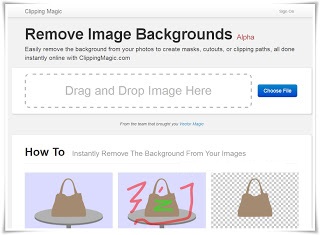
Removing Background of any image or picture by using Photoshop or other software is slightly difficult, if you don't know how to use them.Well,Photoshop is a great software and offers you great features but using Photoshop is slightly difficult and also while removing background of any image using it sometimes ,If your mouse slips while selecting layers , then you are in great problem :p Well today I'm going to introduce you to an amazing tool which will help you to remove the background of any image so easily that you will feel great with this wonderful and amazing online tool.You Do not need to install any application or anything other to use this Online tool You just need Internet Connection. Now Without Wasting much more time let come on the main point 


How To Remove Background Of Any Picture Easily ?

Tutorial

Step 1 :-Open Clipping Magic Official Website [ Link ]


Step 2 :-Open Any Image In It , You can also drag image to upload .


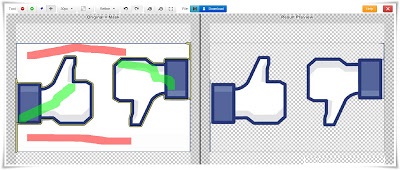
Step 3 :-Now , you will see editor in it.Now you have to use the brushes of different colours to mark foreground and background


The Red Brush is used to mark background.


The Green Brush is used to mark foreground.


After marking you will see you results in right side 

That it .!


Congratulations You Have Removed Background Of Your Pictures !
Now The Most difficult Step  Download that pictures by clicking on download button(on top centre ).
According to me this tools is the best tool in the world and i would like to helps Clipping Magic Admins to provide us such a great online tool ! 

Hope u all liked it..

Trick to Drag Your Facebook Chatbox Anywhere


Guys We Know Facebook Chat box has its Fixed Position . But Today We Will Learn To Drag Your Facebook Chat box anywhere On The Screen,

This is an Awesome Facebook Trick which you willl Like to Perform and Show Your Friends.


We will Use Just 1 Google Chrome Extention Which Will not only enable you to Drag you Chatbox Everwhere but you will also Experience Increase in the Size of your chatbox.

Step 1: First of all To Add Pretty Facebook Chat Extention To your Chrome Browser

https://chrome.google.com/webstore/detail/pretty-facebook-chat/ihamlfilbdodiokndlfmmlpjlnopaobi?hl=en

Step 2: Click on Add to Chrome then you will be asked to Confirm New Extetion, So click on Add Button.

Step 3:The Extention will Start Downloading, Once Downloaded , Just Open Your Facebook and See Your Chatbox. Now You can drag it anywhere on the screen and also the Size of the Chatbox will increase.


Note: If you Want To Revert Changes then just Goto Setting Tools Extentions and Disable the Extention. Or You Can Delete it if you think You Will not Use it again.

FOR FIREFOX USERS TRY THIS ADDSON

https://addons.mozilla.org/en-us/firefox/addon/facebook-chat-history-manager/


Popular Posts

Blog Archive

Powered by Blogger.

Followers

Search This Blog